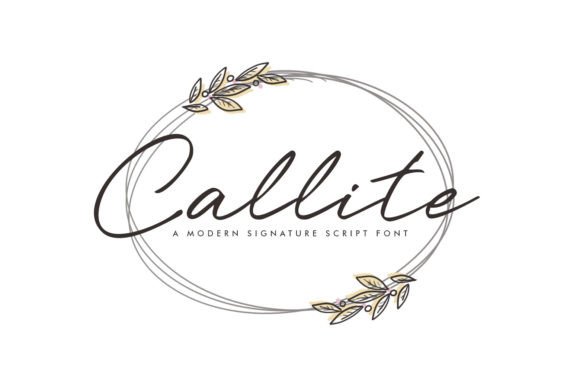
Callite: A Modern Script Font for Web Design Projects
I was in the middle of redesigning a boutique online store’s landing page when I stumbled upon Callite. The client wanted something that felt both clean and elegant, but also had that personal, handcrafted touch. As a web designer, I know how crucial typography is to brand perception and user experience. So I needed a script font that could blend modernity with warmth — and Callite delivered exactly that.
Callite in Hero Sections and Brand Headlines
One of the first places I tested Callite was in the hero section. The headline read “Welcome to Luna & Co.”, and after swapping in Callite, it instantly felt more inviting. Its modern script style brought a sense of sophistication without being too ornate. I made sure to check how it rendered on mobile devices and found that at 48px, it remained highly readable while still conveying its handwritten charm. That’s not always the case with other Script Handwritten fonts, especially when you're trying to balance aesthetics with usability across all screen sizes.
Callite for Boutique Websites and Creative Portfolios
Boutique websites often require a unique identity to stand out from big-box competitors. When I used Callite for a creative portfolio site, it helped establish an artistic yet professional vibe. The subtle flourishes didn’t overwhelm the layout; instead, they enhanced the personality of the design. For instance, the project title “Digital Art Collection” looked stunning in Callite over a high-contrast background image. It became a visual anchor point that guided users through the rest of the page.
I also paired it with a simple sans serif font like Lato for body text and navigation. This contrast worked well because it kept the overall layout balanced and easy to scan. Using a decorative script font like Callite in headers ensures that your message stands out without making your content feel cluttered or hard to digest.
Callite as a Display Font for Product Landing Pages
On product landing pages, the right typeface can influence trust and conversion behavior. For a recent SaaS landing page, I used Callite for the tagline above the main CTA. The phrase “Empower Your Workflow” took on a much more approachable tone compared to a standard sans serif. The soft curves and consistent stroke weight gave it a refined look that matched the brand’s mission of simplicity and elegance.
What I appreciated most was how clean the characters were. Some handwritten script fonts can be inconsistent in spacing or legibility, but Callite maintained a polished edge even when displayed in large sizes. It allowed me to create a strong visual hierarchy by using it sparingly in key spots — like subheadings and promotional banners — where it added flair without compromising clarity.
Using Callite for Logo Text and Branded Elements
Callite isn’t just good for headlines — it’s also excellent for logo text. I recently worked with a small business owner who wanted their brand name to feel both modern and timeless. After experimenting with several Fonts, we settled on Callite for the primary logo. Its stylish character set and smooth flow made it ideal for a signature-style logo that felt personal yet professional.
When designing the digital brand kit, I included guidelines on using Callite in various weights and alternates for different contexts. It’s important to ensure that the font supports the brand’s messaging across multiple platforms — from social media graphics to email headers. And since it's a Script Handwritten typeface, it brings a human element to otherwise sterile digital environments.
Readability Considerations with Callite
- Use Callite at larger sizes (24px+) for optimal readability.
- Avoid using it for long paragraphs or body text.
- Ensure sufficient contrast against background colors or images.
- Check spacing on smaller buttons or call-to-action elements before finalizing layouts.
I’ve learned that even the most beautiful script font can fall flat if it doesn’t perform well in real-world scenarios. Callite passed all my tests — from desktop to mobile, and across dark and light themes. It’s particularly effective when placed over imagery or within a bold header section. Just make sure to give it enough breathing room so the letters don’t feel cramped.
Callite in Editorial and Marketing Content
Magazines and blogs often need a distinctive yet readable typeface for titles and pull quotes. Callite fits perfectly into this niche. On a blog redesign project, I used it for article headers and featured quotes. The result? A fresh editorial look that stood out without sacrificing usability. Readers quickly scanned the content thanks to the clear separation between Callite’s display headings and the supporting sans serif body copy.
It’s also worth noting that Fonts like Callite are becoming increasingly popular in marketing materials. Whether it’s a campaign landing page or a course sales page, a well-chosen Script Handwritten font can help evoke emotion and build a stronger connection with your audience. In one case, I used it for a coaching website’s welcome message — “Your Journey Starts Here” — and it created a warm, welcoming atmosphere that aligned perfectly with the brand voice.
Font Pairing Strategies with Callite
To get the most out of Callite, consider pairing it with a minimalist sans serif like Montserrat or Open Sans. These combinations work well in UI design, especially when building a clean, modern interface with a hint of creativity. Alternatively, for a more editorial or luxury feel, try pairing it with a classic serif font like Playfair Display. This gives your design a sophisticated balance that appeals to discerning audiences.
As part of the process, I always recommend checking the available styles and file formats before committing to a font. With Callite, I found it came with a range of useful alternates and multilingual support, which was a big plus for international clients. Plus, having access to webfont versions makes it easy to implement on responsive sites and maintain performance.
Callite for Banners, Buttons, and Visual Hierarchy
In e-commerce and SaaS projects, banners and buttons are often the first things users see. I used Callite for a couple of banner headlines, such as “Limited Stock Available” and “Join Our Free Workshop”. Both examples benefited from the font’s elegant curves and modern appeal. It helped draw attention to the messages without feeling garish or distracting.
But what about buttons? I tried using Callite for a few short CTA buttons like “Shop Now” and “Get Started”, and it worked surprisingly well. At 16px, it remained legible and visually engaging. However, I’d caution against using it for every button — it should be reserved for high-priority actions where a bit of personality adds value. Otherwise, you risk confusing users with too many variations in your typography system.
Design Assets and Commercial Licensing
Before recommending Callite to a client, I always double-check the licensing details. It’s essential to confirm whether the font supports commercial use, especially for logos, marketing assets, or anything that will appear in print. Fortunately, Callite offers flexible options that suit both personal and professional needs. It’s also great to have access to design assets like glyph variations and ligatures, which can add a custom touch to branding efforts.
For digital creators and entrepreneurs who want to build a cohesive brand identity, having a reliable Script Handwritten font like Callite in your toolkit is invaluable. It helps maintain consistency across your website, packaging, and social media — all while keeping your visuals fresh and appealing.
Why Callite Works for Digital Branding
There’s a reason why Fonts like Callite are gaining traction in the design community. They bridge the gap between casual and professional, making them ideal for brands that want to feel both authentic and refined. Whether you’re launching a new course page or rebranding a small business site, Callite’s modern elegance helps elevate your digital presence.
I’ve seen it shine in a variety of real-life web projects — from lifestyle blogs to product launch campaigns. Its versatility allows it to adapt to different moods and purposes. But the key is knowing when and how to use it effectively. Overusing it can dilute its impact, while underutilizing it might mean missing out on a powerful tool for storytelling and visual branding.
Implementing Callite Responsibly
Here’s what I recommend when working with Callite in your next project:
- Limit its use to headers, logos, and decorative accents.
- Always test it at different sizes and on various backgrounds.
- Pair it with a neutral font for body text and UI elements.
- Review the included styles and file types to match your project needs.
- Confirm commercial license permissions before publishing live.
These steps ensure that your use of Callite remains both impactful and responsible. You want your typeface choices to enhance the user experience, not hinder it.
Callite for Campaigns and Promotional Pages
When creating a promotional landing page for a limited-time offer, the right font can make the difference between a forgettable message and one that resonates. I used Callite for the headline “Celebrate Spring with 20% Off!” and it immediately added a festive yet elegant tone. Paired with a warm color palette and soft imagery, the whole page felt cohesive and inviting.
The best part? Users didn’t struggle to read the message, even though it was stylized. That’s a win for any web designer looking to balance form and function. I also noticed that it helped improve the perceived professionalism of the campaign — proving that Script Handwritten fonts aren’t just for personal projects or creative niches.
Final Layout Notes and Real-World Performance
After running Callite through several real-world web scenarios, I’m confident in its ability to enhance digital layouts. It’s not a do-all font, but when used in the right context — like hero sections, logos, or campaign highlights — it becomes a standout element that users notice and appreciate.
If you're looking for a modern script font that feels both stylish and functional, I’d say give Callite a try. It’s the kind of Fonts that helps your brand speak with confidence and charm, without losing its usability edge. From posters to web headers, it consistently delivers a clean, elegant aesthetic that aligns with today’s design trends.
So the next time you’re selecting a Script Handwritten typeface for your project, remember that Callite offers the perfect blend of artistry and accessibility. It’s a font that looks great, works well, and tells your brand’s story with grace.